GPSLog Labs Blog

GPSLog Labs Blog

Dec 6 / 8:42pm

New GPS Track Filters

GPSLog Labs now has a powerful and customizable filtering feature to clean up errors in your logs caused by bad GPS signals.

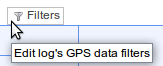
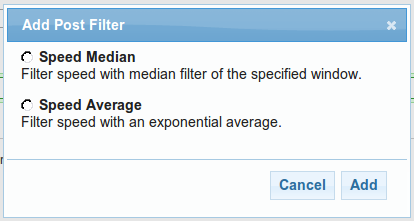
There is a new menu option on the log detail page that will let you edit the filters applied to that log:

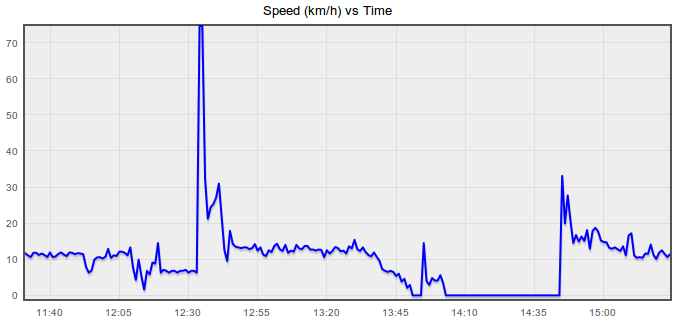
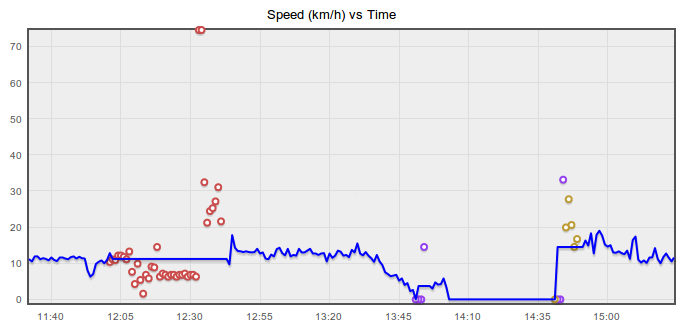
The following graph comes from a log recorded while running and shows the kind of noisy data that is often present.  The incorrect speeds mess up the maximum speed, average speed and distance stats and often correspond to a bad trace on the map too.

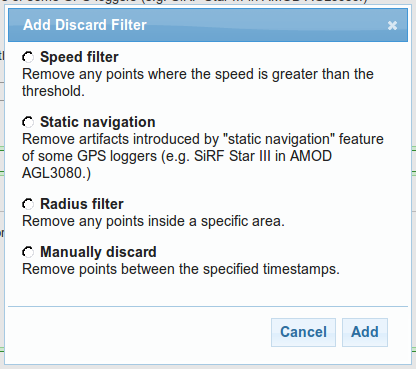
Discard filters

The first filters you can choose from will discard invalid points from your log and then interpolate the speed and course between the remaining points.

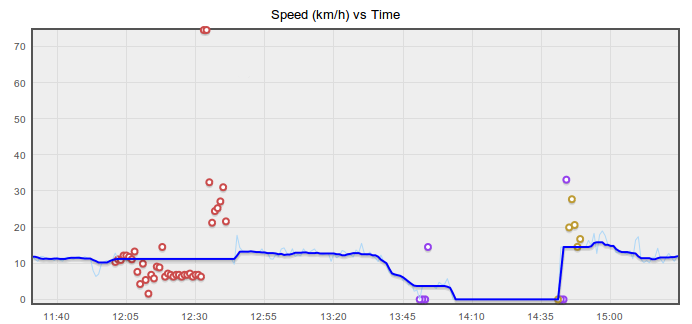
After applying those filters, the speed vs time graph looks a lot better (discarded points are colour-coded to match up with the chosen filters):

Post filters

The second filtering stage applies an average function to the newly cleaned up data.  Smoothing the speed graph will give you a more reliable average and maximum speed statistic and also improve the distance and time split data, but won't clean up the trace on the map or affect the total distance.

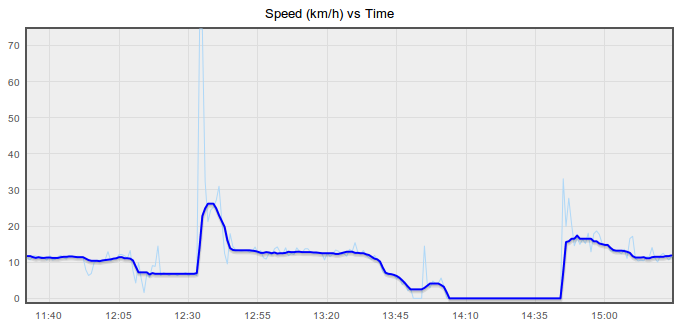
The original speeds are shown on the graph below as a light blue line, and after applying a median filter, the thick blue line has been smoothed (no discard filters were applied for this graph). 

This graph shows the final results when both discard and post filters are applied:

Existing logs

The new filters will only take affect for new uploads, existing logs will retain the data from the old filter that GPSLog Labs used to apply until they are reprocessed.

Also, the discarded points from the old filter will no longer be shown on the Speed vs Time graph on the log detail other graphs tab.  This information is only available now for logs using the new filter system from the Filters menu item.

Try it out

I suggest using a simple Speed Median filter initially, as that will clean out a lot of noise, setting the window time parameter to a larger value will smooth the speed more.  I'll be describing the other filters in future posts.

As always, let me know if you have any difficulties or suggestions, and I hope this new feature helps you get more out of the site and your GPS logger!

-- Tom

Filed under // changelog filters graphs stats

Comments (0)

Aug 23 / 5:35am

Distance split comparison table for routes

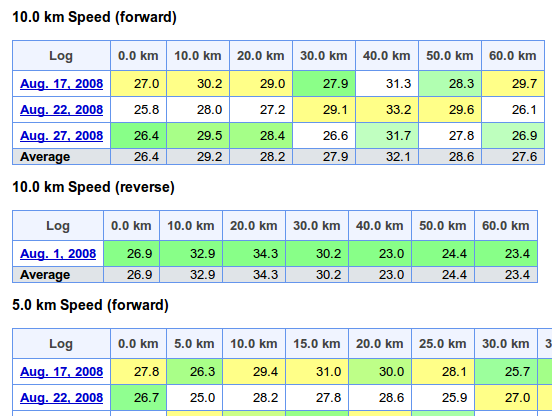
I've added a new tab to the route detail page in GPSLog Labs that compares the distance splits for all logs in the route.

This allows you to see the speeds over each section of the route for each log.  Each column is coloured to indicated min/avg/max in white/green/yellow respectively.  This allows logs that are faster or slower than normal to be easily identified.

For routes that display pace instead of speed, the pace over 1km (or mile) is displayed, i.e. for longer splits, it is not the time to cover the whole split distance.

-- Tom

Filed under // changelog routes splits stats

Comments (0)

Aug 19 / 10:14pm

Update summary for 20th August 2009

This post outlines a few of the recent updates to GPSLog Labs:
  • I've added a "single page view" for a log that shows all the maps, graphs and tables that would be on separate tabs on a single page.  This is best used for printing out the details of an activity as a PDF file (using something like PDFCreator) so they can be shared with other people.
  • I've improved the support for printing of pages (removing unnecessary borders, headers etc.)

    The best printer settings in FireFox appear to be about a 75% or so zoom, select "print background colours" (to show colours in tables of stats).  You can also switch off headers and footers to clean up the output.

    In Internet Explorer, switching on printing of background colours and images is also necessary.

    Printing in Opera isn't really working.  Graphs won't print, and the paths on maps don't print either.

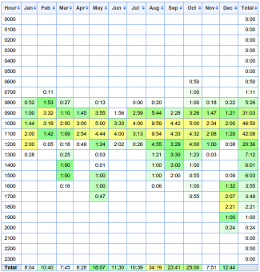
  • There is a new Seasons tab on the tag detail page that shows a table breaking down the activity for that tag by time of day and month of the year.  This can be used to see how your activity varies with the seasons.


  • New battery change selection page.  When a battery cycle goes over 75% of the average for a device, a warning link on the home page will appear.  There is a new page to allow easily selecting the point when batteries were changed or charged.

  • A summary of the current status of your goals (if you have created any) is now displayed in a "dashboard" on the home page.

  • Download graphs: Graphs now have a little "save" icon that appears when you hover over them with the mouse.  Clicking this will download the graph as a PNG file.  Unfortunately, this won't work in IE and the graph doesn't include the labels and legends, so it's not all that useful.
-- Tom

Comments (0)

Jul 14 / 11:38pm

Life logging

There's an interesting article in Wired: Know Thyself: Tracking Every Facet of Life, from Sleep to Mood to Pain, 24/7/365

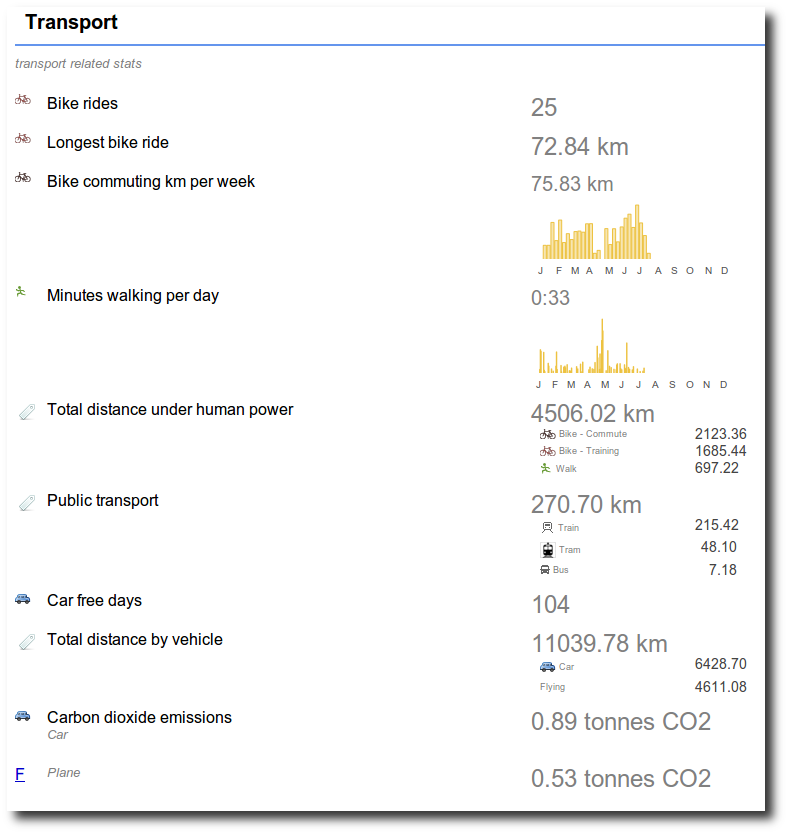
This gives a nice overview of life logging, something which I'm building GPSLog Labs to do.  GPSLog Labs helps quantify a lot of your daily activity based on GPS tracks recorded with cheap and simple GPS data loggers.  By simplifying the process of analysing these logs it's possible to not just get total mileage you've traveled, but also the amount of time you spend at different places and doing different activities.

While it can't yet come close to something as comprehensive (and nice to look at) as the Feltron Annual Report, the GPSLog Labs reports are heading in that direction.  The summary of your collected data can be exported in CSV format if you're keen enough to want to make something that looks really good!

-- Tom

Filed under // lifelogging reports stats tips

Comments (0)

Jul 14 / 11:15pm

Summary of activity for all GPSLog Labs users

There's a new publicly accessible page that shows the total activity of all GPSLog Labs users, broken down by day of week, month, and time of day.

-- Tom

Filed under // changelog stats

Comments (0)

Jul 14 / 11:12pm

Summary stats by time of day

I've just added a new breakdown by time of day on the stats summary page.  This will show your total activity logged by the hour of the day when the activity started.  It also breaks out the times by tags and places, the same as the by day of week and month breakdowns.  It is interesting to see how your commute times, excercise times, vehical usage patterns vary.

-- Tom

Filed under // changelog stats

Comments (0)